

• 3 Posts
  • 48 Comments
Joined 3 years ago
cake
Cake day: June 18th, 2023

help-circle

  • I’ve been a Joplin user and using their Joplin Sync server for a few years now. Last night, I migrated everything over to Obisdian and just finished setting up a self hosted obsidian sync. I will say that the self hosted sync was nothing short of a puzzle for me but finally nailed that down between my phone and desktop app. So, I have the same as Joplin now for that functionality.

    What got me started on this little side journey, is I’ve been seeing more and more pretty cool uses for Obsidian and have a lot of great things about it. I’m not dumping Joplin yet, but am giving this a solid try before I make any hasty decisions.



  • There are other services which should work for you as well. I use one which never requires a regular check in. They even ofter a command line curl or other methods to send your updated IP to it. Think Home Assistant, via a curl or if you have a router with Freshtomator or other which supports such curl, it will work as well.

    https://freemyip.com/

    I’ve been using them for a few years now and never ever had an issue with uptime or otherwise. My use is just as a backup in the event my VPS goes down which hosts Pangolin (VPS).

    Others such as noip.com and such do work well also.


  • node815@lemmy.worldtoSelfhosted@lemmy.world•Joplin sync
    link
    fedilink
    English
    arrow-up
    18
    ·
    1 month ago

    I use the docker version of the Joplin Server, it syncs with everything I’ve thrown at it which is a laptop, my Android Phone(s) over the years and my Desktop with no issues. It’s super basic so you just set up an account in the self hosted server and then proceed to login using the Synchronization settings in your Joplin App.

    If you have any existing data, Make sure to Back it up First!

    This is my compose I use. Sub with your values obviously.

    services:
        db:
            image: postgres:15.4-bullseye
            volumes:
                - /mnt/appdata/joplindb:/var/lib/postgresql/data
            ports:
                - "5432:5432"
            restart: unless-stopped
            environment:
                - POSTGRES_PASSWORD=postgres
                - POSTGRES_USER=postgres
                - POSTGRES_DB=joplin
        app:
            image: joplin/server:latest
            depends_on:
                - db
            ports:
                - "22300:22300"
            restart: unless-stopped
            environment:
                - APP_PORT=22300
                - APP_BASE_URL=https://public.url.example.com/
                - DB_CLIENT=pg
                - POSTGRES_PASSWORD=postgres
                - POSTGRES_DATABASE=joplin
                - POSTGRES_USER=postgres
                - POSTGRES_PORT=5432
                - POSTGRES_HOST=db
                - MAILER_ENABLED=1
                - MAILER_HOST=yourmailhost
                - MAILER_PORT=587
                - MAILER_SECURE=0
                - MAILER_AUTH_USER=Your Email user
                - MAILER_AUTH_PASSWORD=Your Super Secret Password
                - MAILER_NOREPLY_NAME=Your No Reply Name (eg:  Noreply box)
                - MAILER_NOREPLY_EMAIL=no reply email address
                - TZ=America/Los_Angeles 
    volumes:
      joplindb:
    

    And then in the settings for the sync in the app:

    Failsafe switch to prevent overwrite of Joplin data on local device

    To get there, Go to the Tools > Options > Synchronization

    Hopefully this will help. :)


  • You ask how people handle how many adds are shoved when using their devices. I think it’s due to the slow immersion into them over the years. Early web was mostly banner ads which became flashy and distracting. It started around that time and people being people, most just never really thought different as that’s the way the WWW is.

    For those of us who run adblockers or use an ad-blocking DNS, and have done so for many years, it is quite jarring to see the unfiltered ad-infested scape of the web. (Most commonly when installing an new OS and not yet setting up the DNS) Some people are happy with them as every search engine ad link they click works and they go about their merry way.


  • If you are using Authentik, it will work good, but may be uneccessary if all you want is secure authentication, this is becuase Cloudflare does a “Zero Trust” model in which only approved email addresses, would be able to acess your site which you have to manually approve, otherwise, they get hit with the Cloudflare wall. This is completely free and voluntary!

    In terms of Cloudflare, I assume that you have your domain all set up with the DNS servers pointed to Cloudflare from your domain registrar. This is probably the hardest part of it all. Then, it’s just a matter of setting up your redirection to your server. I used to use them but haven’t been in it for about a year now for my domains. They are a good company and will certainly help with your site’s security.

    Nginx Proxy Manager is like the reception desk for all traffic, when WWW comes in and asks for site.example.com NPM sees that and matches it up with the IP address/port of your server and sends it on it’s merry way. If you are using Cloudflare Tunnels, and after you install their tunnel adaptor, you can skip NPM and just point to the IP and internal port on your server. Pretty straight forward in that area. They have great documentation on how to do this to get you started.

    Basically, if you use Cloudflare tunnels, you can skip NPM and free up some resources if you want as it will be redundant. So, then Authentik comes in and can act as a traffic cop and protect all types of pages, ones with log in and those without.


  • The thing about Tuya devices is they are a white label provider which allows manufacturers to brand the Tuya Device as their own. This is causing a massive saturation in markets such as Amazon where the lower price is king. I had some Costco 'Feit" branded bulbs which turned out to set up on Tuya so it’s not just Amazon or Costco, other companies do it as well. I have a WiFi dehumidifier I bought before I got into the home automation scene which is Tuya based. They often masquerade behind apps such as SmartLife, Uhome or Feit and others with their GUI using nothing more than API Calls to the Tuya servers in China.

    You can still obtain the local product keys on Tuya Developer portal which allows you to locally control your devices without the cloud, but they are making that harder to find. i was able to track some down about a month ago on a device I was evaluating. You can use other plugins too which decouple it from the cloud with your local key such as Xtended-Tuya, Tuya-Local and the like in Home Assistant so you can technically ignore the comms to China and I’ve found that some of those in tandem with each other have unlocked some extra features that the Tuya app never reveals for the device.

    Ultimately, they are a very cost effective device to install in your home and often times you don’t know it’s Tuya Based until you poke around. I’m not defending them in any way, rather I am stating my observations and thoughts as to why it’s so pervasive. I wouldn’t be surprised if some Ovens or refrigerators were linked in some way to them as well.


  • I have mine connected to Logitech Z553 speakers which my PC uses. The speakers have great sound and very impressive bass response rivaling high end speakers. The volume control knob has an aux input on it so I can feed an external source to the speakers. I then used a 3.5mm male to male audio cable to connect the Voice PE to the input on the speakers. This has created rich sounding voice responses. :) I use the Nabu Casa cloud voices and the Candadian Voice “Liam” which sounds good with these speakers. The speaker is in my living room which our main area and where the voice PE is so it makes sense to be there.


  • I can’t pull the image:

    docker run -d \
      --name pocket-tts-wyoming \
      -p 10201:10201 \
      -e DEFAULT_VOICE=alba \
      -v pocket-tts-hf-cache:/root/.cache/huggingface \
      -v pocket-tts-cache:/root/.cache/pocket_tts \
      pocket-tts-wyoming
    Unable to find image 'pocket-tts-wyoming:latest' locally
    docker: Error response from daemon: pull access denied for pocket-tts-wyoming, repository does not exist or may require 'docker login': denied: requested access to the resource is denied


    I am logged into Docker as well via docker login.
    edit I cloned the repo via Git and was able to get it to build and run.


  • node815@lemmy.worldtohomeassistant@lemmy.world•Smart Lock
    link
    fedilink
    English
    arrow-up
    2
    ·
    11 months ago

    I use a Nuki Smart Lock Pro for mine (US Version), With this one, it still allows you to unlock your door with your usual house key which is perfect for renters and those who share access. Before this, I used an August Lock. Both of which can interface easily with Home Assistant for example making them cloud free if you should decide to. The Nuki lock for me is better and much nicer than the August (I had the Model 2). It offers local control and also cloud if you want to be able to unlock your door from the office for example.

    You have to be careful with Tuya. Tuya allows makers to build products and resell them under a white label system, this can often result in copy cat products. Some companies more secure than others. With the Tuya cloud cutter, this will work and permanently decouple your device from Tuya, but only if it’s supported. I use My Tuya List the above Tuya controllers for some of my items and each supplements the other. I have a Tuya Dehumidifier, a CO2 detector, camera, light bulbs, panic alarm and a home alarm all of which I can control locally without the Tuya Cloud using thie local keys you can get from Tuya’s site.

    I keep the tuya plugin so I can log in and control some of those devices which don’t have a local key (there are a few), the Xtend Tuya can often provide more functions and then of course the local Tuya plugins for what I can control locally.


  • I moved my setups to Pangolin and placed it on a VPS and then just have been using it since and is about the same as I could run it with a CDN such as Cloudflare. I know Cloudflare has better security with things but I also use Crowdsec which has been nice for keeping most things away. I host my email through Mxroute so it’s never an issue. While Cloudflare has been very stable for years, this last outage didn’t affect me like it would have, although I’m just use the stuff or my purposes.

    I left Cloudflare because I was ready to move away from there and found that Pangolin offered what I was looking for. No hard feelings either way toward Cloudflare at all.


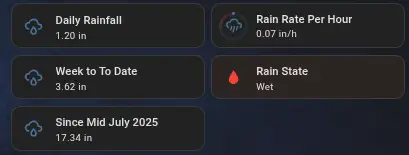
  • I have the Ecowitt WS90 with a gw2000 hub which has been solid since I installed it Mid July of this year:

    Displays Daily Rainfall, Rain Rait Per hours, Week to date Totals, Rain State and the totals so far.

    This is from Home Assistant and (Yes it says the rain state is WET It’s either that or dry, a very binary state on the sensor) I live in the PNW where it mostly rains this time of year so the totals are pretty accurate. It uses a Rain Piezo which works by converting the mechanical vibrations caused by raindrops hitting its surface into electrical signals. This process allows the sensor to detect rainfall. I’ve been toying with the idea of getting a manual rain gauge to confirm the totals, but I’m happy with it so far though!